9000Pa Handheld Vacuum & Air Duster for Fast Cleanups
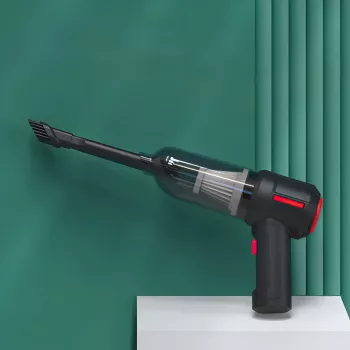
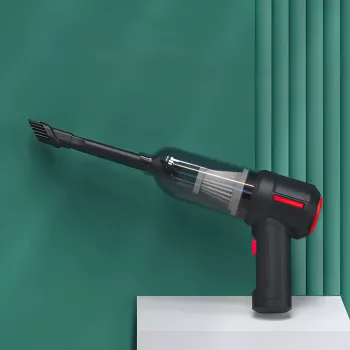
9000Pa Wireless Handheld Vacuum & Air Duster: Small Tool, Big Everyday Impact
A compact cordless cleaner that combines strong suction with targeted air blowing can handle everyday messes without dragging out a full-size vacuum or buying disposable compressed-air cans. From car crumbs to keyboard dust to the grit that collects along baseboards, a handheld vacuum/air duster combo is built for fast, focused cleanup—especially in tight spaces where traditional tools struggle.
What this handheld cleaner is designed to do
This style of cordless handheld is all about short, high-impact cleaning sessions. It’s designed to:
- Tackle quick cleanups in tight spaces like keyboards, PC vents, car consoles, sofa seams, drawers, and seat tracks.
- Switch between suction and blowing so dust can be dislodged from crevices and then collected.
- Handle dry debris (crumbs, hair, dust) and, when the device supports it, small wet messes with careful technique.
- Reduce reliance on disposable compressed-air cans for routine dusting tasks.
Performance highlights that matter day to day
Suction strength (up to 9000Pa)
Suction rating helps set expectations for real-world pickup—like lifting grit from floor mats, grabbing crumbs from seat rails, and pulling dust from corners. Embedded debris (especially pet hair in upholstery) may still take multiple passes, but stronger suction shortens the job.
Air-duster function for “before you vacuum” dust
Air blowing shines when dust is wedged where a nozzle can’t seal—vent slats, switch gaps, keyboard edges, and textured trim. Dislodge it first, then switch to suction to capture it before it resettles.
Cordless convenience
Grab-and-go matters more than it sounds. A cordless handheld is often used more frequently simply because it’s quick to start, easy to carry, and doesn’t require a wall outlet—ideal for car detailing and desk areas.
What affects results the most
- Nozzle choice: crevice tools reach what wide heads can’t.
- Filter condition: a dusty or damp filter can noticeably cut airflow.
- Debris type: fine dust and hair load up the bin and filter faster than larger crumbs.
Where it fits best: common use cases
- Car interiors: cup holders, center console gaps, seat tracks, trunk corners, and floor mats.
- Desk and office gear: keyboards, mouse areas, printer exteriors, and workstation crumbs.
- Home quick hits: window sills, baseboards, sofa seams, stair corners, and pantry shelves.
- Small wet messes: tiny spills on hard surfaces—wipe up excess first, then use wet pickup carefully if supported by the device’s design.
Suction vs air blowing: when to use each mode
Think of blowing as the “loosen” step and suction as the “remove” step. Blowing is best when a crevice is too narrow for good suction sealing, while suction is better for anything you can physically reach and collect.
| Task | Better mode | Tip |
|---|---|---|
| Keyboard surface crumbs | Suction | Use a narrow nozzle and short passes between keys. |
| Air vents (car/AC) | Blowing then suction | Dislodge dust first, then capture it immediately. |
| Sofa seams and pet hair | Suction | Work slowly; clean the filter more often. |
| Liquid droplets on hard surface | Wet pickup (if supported) | Remove excess with a towel first; avoid soaking the unit. |
Electronics handling tips
- Keep airflow controlled and avoid pushing the nozzle directly into delicate components.
- Don’t overspin small fans—hold the nozzle slightly back and use short bursts.
- For general air-blowing safety context, review OSHA’s guidance on compressed air practices: OSHA – Compressed Air: Safe Practices.
Wet/dry cleanup basics and safety
Wet pickup is useful, but only when the unit is designed for it and only for small amounts. Confirm which parts are washable (often filters and dust cups) and which should never get wet (motor housing, charging port).
- Avoid vacuuming hot ashes, fine construction dust, or large volumes of liquid unless explicitly supported.
- After any wet pickup: empty promptly, clean as allowed, and let components dry fully to prevent odor and mold.
- Keep airflow unobstructed; a clogged filter reduces suction and can stress the motor.
For moisture and mold prevention basics after wet cleanup, see: U.S. EPA – A Brief Guide to Mold, Moisture, and Your Home.
Battery, charging, and runtime expectations
Accessories and attachments that make a difference
Cleaning and maintenance for consistent suction
For additional indoor dust considerations, see: NIOSH – Indoor Environmental Quality.
When a handheld vacuum-air duster is the right tool (and when it isn’t)
Product picks available now
- 9000Pa Wireless Handheld Vacuum & Air Duster – Portable Wet/Dry Cleaner (compact option for dry debris, detailing, and targeted dusting)
- 52-Cup 5-Stage Water Filter Dispenser with Real-Time TDS Meter & Lead Reduction (helpful for everyday home upkeep alongside cleaning routines)
- Heavy-Duty Aluminum Pipe Wrench (a practical add-on for basic household maintenance and quick fixes)
FAQ
Is it safe to use an air duster on a computer keyboard or PC vents?
Yes, when used carefully: keep a small distance, use short bursts, and avoid direct contact with delicate components. Prevent small fans from overspinning, and follow both the cleaner’s instructions and the device manufacturer’s guidance.
What should be done if suction drops after a few uses?
Check in this order: empty the dust cup, inspect the nozzle path for clogs, clean and fully dry the filter if it’s washable, then recharge the battery. A damp or dirty filter is one of the most common causes of sudden performance loss.
Can it clean up liquid spills?
It can handle small wet messes only if the unit supports wet pickup, and it works best after you wipe up excess liquid first. Empty and dry components promptly to help prevent odors and moisture issues, and avoid large-volume spills.



Leave a comment